
Describe it with a text prompt
You describe the music and the AI decides the melody, arrangement and, if vocals are on, the words. This is the quickest path for instrumentals, background tracks, beats and mood pieces.
Learn how to make AI music from a first idea to a track you can actually use: picking an input mode, writing a clear prompt, choosing vocals or instrumental, and improving results one change at a time.
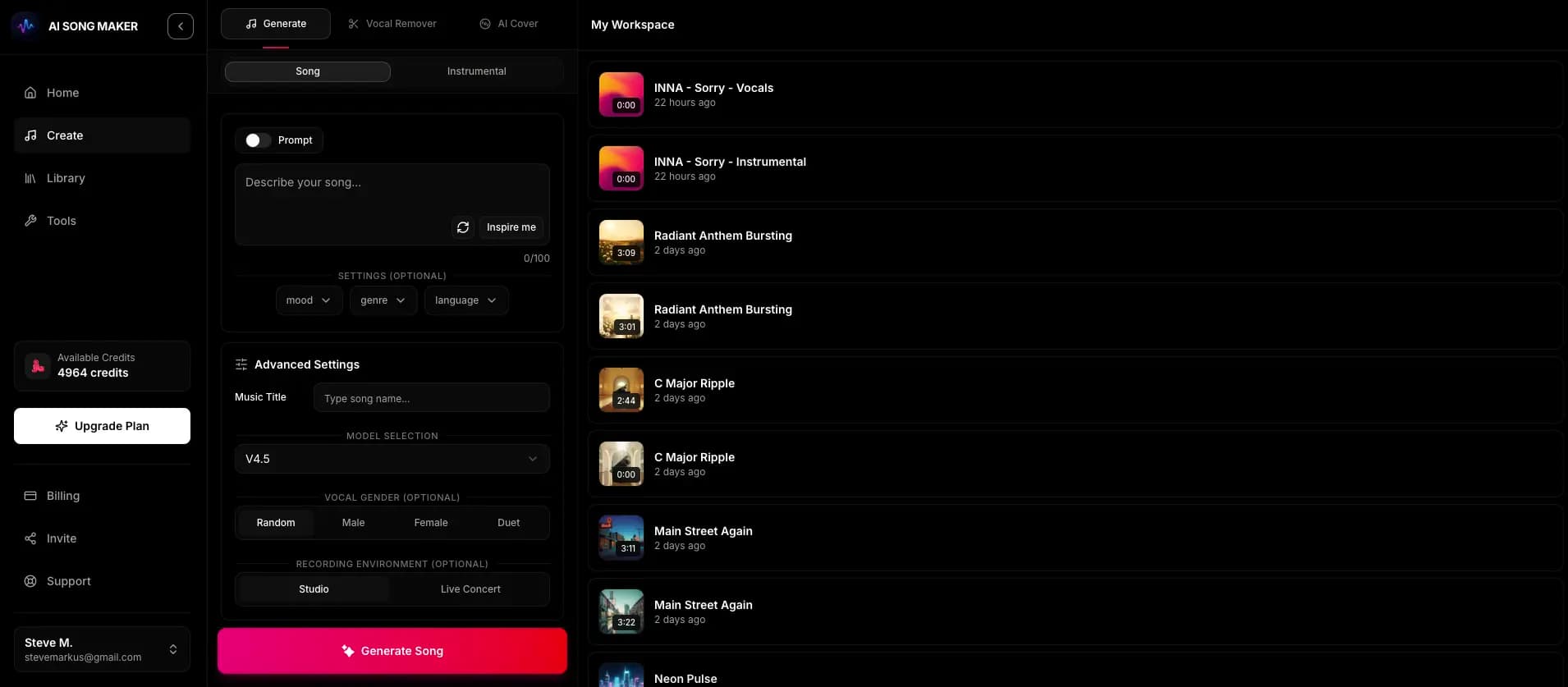
This is the workflow that tends to produce usable tracks fastest. Each step has one job, so when a result misses, you know which step to revisit.
Write one sentence about where the music will live: a video intro, a study playlist, a birthday song, a game menu. The use case tells you whether you need vocals, how busy the arrangement can be and how much energy it should carry.
Use a text prompt when you want the AI to handle everything, including any words. Use lyrics mode when you already have words you want sung exactly; you paste up to 5,000 characters and add a style description.
Name the genre, mood, two or three lead instruments, a tempo feel and the use case. A prompt like "warm acoustic folk, fingerpicked guitar and soft cello, slow and hopeful, for a wedding slideshow" gives the model far more to work with than "nice happy song".
Turn on the instrumental switch for background music, beats and anything that will sit under speech. For vocal tracks you can set a male or female vocal preference.
Each creation uses 2 credits and returns two takes of the same idea, usually within a minute or two. Listen to both all the way through before deciding; they often differ in melody, pacing and instrument balance.
If neither take is right, adjust a single variable, such as the tempo word, one instrument or the mood, and generate again. Changing everything at once makes it hard to learn what actually helped.
Finished tracks appear in your Library. You can listen there on any plan; downloading audio files requires a paid plan, and commercial use has its own license terms covered below.
Music AI Generator has two ways to create. Picking the right one up front saves more credits than any prompt trick.
You describe the music and the AI decides the melody, arrangement and, if vocals are on, the words. This is the quickest path for instrumentals, background tracks, beats and mood pieces.
You paste lyrics you wrote and describe the style, and the AI sings your words. Use section labels like [Verse] and [Chorus] so repetition and pacing are clear.
Draft words with the AI Lyrics Generator, which is free for signed-in users and uses no credits, edit them until they sound like you, then send them into song creation.
If the exact words matter, use lyrics mode. If the feel matters more than the words, or there should be no words at all, use a prompt.
A strong music prompt reads like a short brief to a session musician. Aim for one or two sentences that cover these ingredients, in roughly this order.
Be as specific as you can hear it: "synthwave", "bossa nova", "cinematic orchestral" or "lo-fi hip hop" all point in clearer directions than "electronic" or "chill".
Pair a feeling with an energy level, for example "melancholic but steady" or "bright and bouncy". Mood alone leaves the intensity to chance.
Name two or three instruments that should carry the track. Listing eight instruments usually produces a crowded mix or gets partly ignored.
Words such as "slow", "mid-tempo", "driving" or "laid-back groove" are reliable. You can include a BPM, but treat it as a hint rather than an exact setting.
Adding "for a product demo video" or "for a late-night study session" helps the model choose sensible density and dynamics.
Every creation costs 2 credits, so treat each generation as an experiment with one clear question.
Before regenerating, say in plain words what missed: too fast, too busy, wrong instrument, vocals too dramatic. That sentence tells you what to change.
Swap "upbeat" for "relaxed", or "synth lead" for "electric piano", and keep the rest identical. When the next result improves, you know why.
Paste each prompt and a one-line verdict into a note. After a few rounds you will have a personal set of phrases that reliably work for your style.
Free accounts use V6 Lite. Paid plans can also choose V6 Pro and V6 Studio, which is worth testing when a prompt is right but the rendering is not.
Once you have a take you like, the Pro-plan tools (available on Pro and Studio plans, 2 credits each) let you build on it instead of starting over.
Pick one of your songs or upload a track, choose the second you want to continue from and optionally add a style. The AI writes a continuation from that point.
Combine two tracks, A and B, into one new remixed track. It blends ideas from both; it does not separate stems or remove vocals.
Re-render an uploaded track in a new style, for example turning an acoustic idea into a synth-pop arrangement.
The output is a finished, mixed audio file. There is no MIDI export, no separate stems and no multitrack editing, so plan any detailed editing in your own audio or video software.
"A cool song" gives the model nothing to aim for. Genre, mood, instruments and a use case take only a moment to write.
"Calm, aggressive, minimal and epic" pulls in four directions. Pick one clear mood and one energy level.
Intros can be sparse. Listen to at least one full chorus or build before you discard a take.
Describe the sound you want, such as "raspy blues vocal" or "airy indie-pop vocal", instead of naming real artists.
If one element was off, fix that element. Starting from scratch throws away the parts that were working.
Each example follows the genre, mood, instruments, tempo and use-case pattern from this guide. Swap in your own details.
Lo-fi hip hop, mellow and warm, dusty drums, soft Rhodes chords and vinyl crackle, slow laid-back groove, for a late-night study session.
Bright indie pop, optimistic and clean, plucky guitar, handclaps and light synth pads, mid-tempo, for a friendly app walkthrough video.
Feel-good acoustic pop with a female vocal, playful and warm, strummed guitar and light percussion, mid-tempo, celebrating a close friend's birthday.
Cinematic orchestral, tense then triumphant, low strings, taiko drums and brass swells, slow build to a powerful peak, for a game trailer.
Retro synthwave with a male vocal, nostalgic and dreamy, analog bass, gated drums and shimmering pads, driving mid-tempo, about a midnight drive.
Sign up, open the create page and write one or two sentences naming a genre, a mood, a few instruments and what the music is for. Choose instrumental or vocals, generate, and compare the two versions you get back. No music theory is needed.
Each creation uses 2 credits and returns two versions of the track. New accounts get free starter credits to try it out; paid plans add weekly or monthly credits.
Usually a minute or two. Track length varies from one generation to the next, so if you need a longer piece, Pro and Studio plans include Extend Audio to continue a track from a chosen point.
Downloading audio requires a paid plan. Free users can create with their starter credits and listen to their tracks in the Library.
Pro and Studio subscribers can generate a song-specific, non-exclusive Content Usage License from the Library for eligible commercial projects, subject to its terms. Other plans and free credits do not include that license. See the licensing page for details.
No. The output is a finished, mixed audio file without stems or MIDI. You can guide results with your prompt, regenerate, or use Pro tools such as Extend Audio, AI Music Remix and AI Cover.
Write a short prompt, pick instrumental or vocals and compare two versions. Your starter credits are enough to try the whole workflow.
Try It Now