
Intro
"Sparse piano intro" or "ambient pad intro" asks for a gentle opening before the full groove arrives. Useful when music starts under a title card.
A practical guide to making instrumental music with AI: describing arrangement, picking instruments that fit the mood, controlling energy and shaping tracks that work behind videos, games and study sessions.
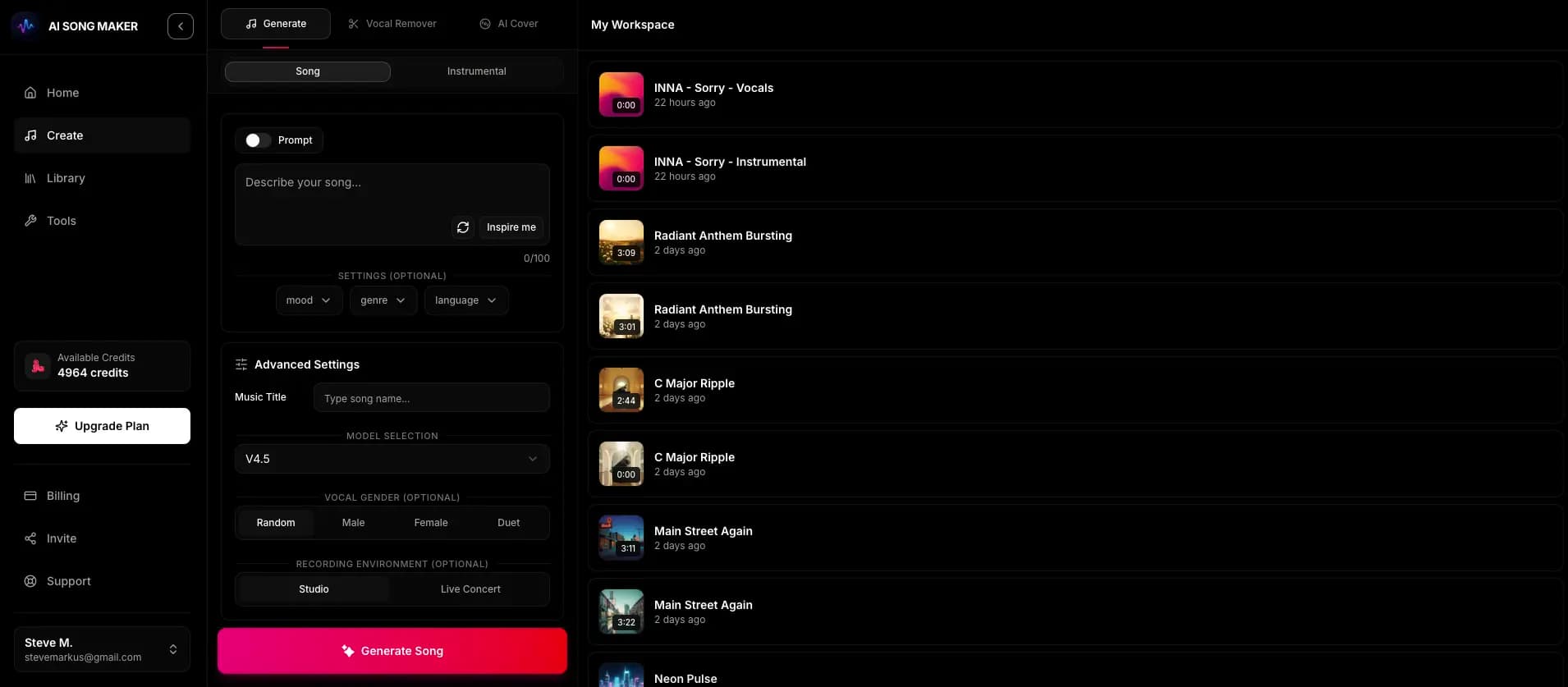
Instrumentals have no lyrics to carry the idea, so the arrangement, instruments and energy have to do all the work. These steps keep each of those decisions deliberate.
Is it a focus track, a video bed, a game menu loop or a standalone piece? Background music should stay steady and leave space; a standalone piece can build and surprise.
In Music AI Generator, the instrumental switch tells the model not to add vocals. Writing "no vocals" in the prompt is not as reliable as the switch.
Choose one genre and two to four instruments that suit the mood. A small palette gives a clearer, more focused mix.
Use arrangement words such as "soft intro", "gradual build", "drop" or "gentle outro", and pair them with an energy level like "steady and understated" or "high-energy".
Each creation uses 2 credits and returns two versions, usually in a minute or two. Listen for which one keeps the energy where you need it, not just which sounds nicer on first play.
Change a single element, such as the tempo word or one instrument, and generate again. Keep notes on which words moved the result in the direction you wanted.
You cannot draw sections on a timeline, but you can describe the shape you want. These terms are widely understood and give the model a structure to aim for.
"Sparse piano intro" or "ambient pad intro" asks for a gentle opening before the full groove arrives. Useful when music starts under a title card.
"Gradual build" or "slowly layering percussion" asks for rising intensity. Good for trailers, countdowns and reveal moments.
"Big drop" or "bass drop after the build" suits EDM, trap and hype edits. Leave it out for background music that needs to stay even.
"Stripped-back breakdown" creates a quieter middle section, handy when a video has a reflective moment halfway through.
"Gentle fade-out outro" or "clean ending" helps a track finish naturally instead of stopping abruptly.
"Consistent energy, no big changes" is the phrase to use when the track needs to sit quietly under speech or during focus sessions.
Pick two to four instruments from one line below as a starting point, then adjust to taste.
Soft piano, warm Rhodes, mellow electric guitar, light brushed drums, ambient pads.
Ukulele, plucky acoustic guitar, handclaps, glockenspiel, bright synth plucks.
Full strings, French horns, taiko drums, choir-like pads, low brass hits.
Low drones, pulsing synth bass, detuned piano, ticking percussion, distant metallic textures.
Analog synth pads, chorus-soaked guitar, tape-warped keys, soft drum machine.
Punchy 808 bass, crisp hi-hats, clean synth lead, tight snare, short synth stabs.
The generator returns a finished track rather than a seamless loop, but you can ask for music that is easy to loop or trim in an editor.
"Consistent groove, no big drops, no dramatic ending" produces sections that repeat cleanly when you loop them.
A track that starts and ends at similar intensity is easier to repeat. You can always trim the first and last few bars.
Most video editors can crossfade the end of a clip into its own start. A short crossfade hides small differences at the loop point.
Track length varies by generation. On Pro and Studio plans, Extend Audio continues a track from a second you choose, which is useful for longer videos or streams.
You get a mixed audio track. There are no stems, no MIDI and no per-instrument volume controls, so describe balance in the prompt, for example "piano in front, drums soft".
The two versions can differ quite a lot. Compare them before changing your prompt, since the one you need may already be there.
Listening in the Library works on any plan; downloading requires a paid plan. Commercial use needs a Pro or Studio plan and the Content Usage License generated per song.
Use these with the instrumental switch on. Each names a genre, mood, a small instrument palette and a shape.
Minimal ambient piano, calm and steady, soft felt piano with a warm pad underneath, slow tempo, consistent energy with no big changes.
Sunny indie folk, carefree and bright, acoustic guitar, ukulele and light shaker, mid-tempo, short soft intro and a clean ending.
Epic orchestral, determined and hopeful, strings and French horns over taiko drums, starts quiet and builds to a powerful final section.
Moody trap beat, tense and confident, heavy 808s, crisp rolling hi-hats and a haunting bell melody, mid-tempo half-time feel with a hard drop.
Gentle chiptune-inspired lo-fi, cozy and playful, soft square-wave lead, warm bass and brushed drums, steady groove with no dramatic ending.
Describe the track in plain words: a genre, a mood, two to four instruments and how the energy should move. Turn on the instrumental switch and generate. You get two versions to compare, and you can refine by changing one word at a time.
Use the instrumental switch rather than only writing "no vocals" in the prompt, and avoid words like "choir", "vocal chops" or "singer" in your description.
You can include a BPM as a hint, but it is not a precise setting. Tempo feel words such as "slow", "mid-tempo" or "driving" are usually more dependable.
No. The output is a finished mixed audio file with no stems or MIDI. Describe the balance you want in the prompt, such as "guitar up front, drums in the background".
Pro and Studio subscribers can generate a song-specific, non-exclusive Content Usage License for eligible commercial projects, subject to its terms. Other plans do not include that license. See the licensing page for details.
Turn on the instrumental switch, describe the mood and shape, and compare two versions of your track.
Try It Now